Portability · 11 min read
Markdown Outside the Ring: A Feature-by-Feature Portability Guide
Footnotes, math, Mermaid, callouts, wikilinks, and YAML front matter each belong to exactly one tool. Nobody owns the spec. Here is what silently breaks when a file moves.
In the last post we drew a ring: stay inside core CommonMark and GFM — headings, links, images, fenced code, pipe tables, task lists — and your file renders correctly essentially everywhere. This post is about everything outside that ring.
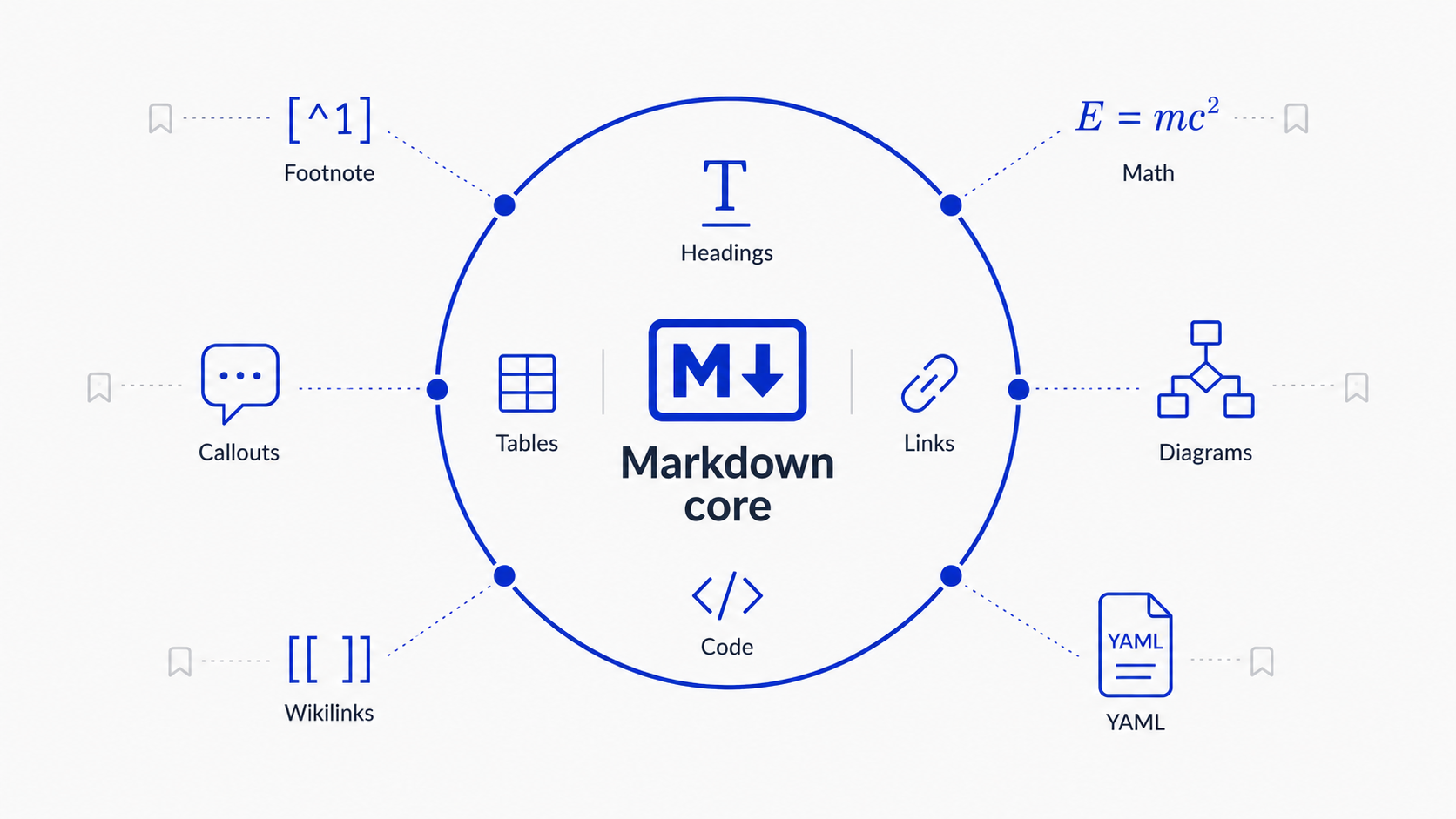
The surprising thing about the outside is not that it’s unstandardized. It’s who standardized it. Every feature out there — footnotes, math, diagrams, callouts, wikilinks, front matter — belongs to exactly one tool. Not a working group, not a spec, a tool. Footnotes belong to PHP Markdown Extra. Math belongs to Pandoc and academia. Diagrams belong to Mermaid, a single open-source project. Callouts belong to Obsidian. Wikilinks belong to wiki culture by way of Obsidian. Front matter belongs to Jekyll. When GitHub adopts one of these, it doesn’t ratify a spec; it picks a winner someone else built.
That has a practical consequence: each feature fails differently when it leaves home. Some fail safe, some fail loud, and some fail in ways that silently change your document’s meaning. Before the feature-by-feature tour, it’s worth being precise about what “support” even means.
Three contracts, not one
“Does this app support Markdown?” sounds like one question. It’s really three:
- Parse — does the parser recognize the construct as a special form, or as ordinary text?
- Semantics — if it recognizes it, what meaning does it assign? (GitHub’s five fixed alert types versus Obsidian’s dozen-plus custom ones.)
- Presentation — can the renderer actually display that meaning? (Mermaid renders on github.com but not in GitHub’s own mobile apps.)
This is why fallback behavior differs so much between features. Mermaid fails safe because its source lives inside a standard fenced code block: the parse survives everywhere, and only the semantics and presentation are missing. Wikilinks fail noisy because they are a non-standard inline form — the parse never happens, and the punctuation leaks into the prose. Front matter fails wrong because it reuses syntax that already means something in CommonMark; it doesn’t just miss the parse, it corrupts it.
So the useful question is not “does this app support Markdown?” It is: what document does this parser produce from these bytes? Keep that question in mind for the six features below — for each one we care who owns it, who else renders it, and what it turns into when nobody does.
Footnotes: the oldest extension still isn’t in the spec
The [^1] syntax comes from PHP Markdown Extra, which Michel Fortin shipped around 2005. It is over twenty years old, works in Pandoc, Obsidian, Typora, and most static site generators, and reads like the most boring, settled feature in Markdown.
GitHub added footnotes on September 30, 2021. But here is the part people miss: footnotes are not in the GFM spec. Open the spec at github.github.com/gfm and search for them — tables, task lists, strikethrough, autolinks, no footnotes. They are a feature of GitHub’s renderer, documented on GitHub’s docs site, invisible to anyone who implemented the spec. The de-facto standard and the platform that defines it are quietly out of sync.
And even on GitHub the support is shallower than it looks: footnotes render in READMEs, issues, and comments, but not in GitHub’s own wikis. When the platform that owns the de-facto standard can’t apply it consistently across its own product, you get a preview of everything else in this post.
Failure mode: mild. An unsupported tool shows the literal [^1] inline and the definition as a stray line at the bottom. Ugly, but readable and honest.
Math: three syntaxes, three renderers, one currency problem
Math is the feature with the most competing answers. Inline $...$ and block $$...$$ came out of the Pandoc/academic world; GitHub adopted them on May 19, 2022, rendered with MathJax, and also accepts a fenced ```math block. GitLab renders the same fence with KaTeX. Obsidian and Typora render $/$$ live in the editor. And underneath all of it, the browser world quietly settled something big: MathML became a Baseline web feature in 2025, so every modern engine can typeset math natively with zero JavaScript.
So math mostly works — until you look at the edges, where each tool draws the inline-math line differently. Does $ need a non-space character right after it? What about $5 and $10 in a sentence about prices — text, or an equation? GitHub, Obsidian, and Typora answer these questions differently, which means the same sentence can be prose in one editor and a broken formula in another. The dollar sign was a terrible choice of delimiter, and it was chosen decades ago, and we are all stuck with it.
Failure mode: loud but lossy. Unsupported tools show raw LaTeX source — readable to the author, gibberish to everyone else. Worse, the failures are often invisible to the writer: ChatGPT’s Android app has had recurring stretches where it displays raw LaTeX source for equations that rendered fine on desktop, and the person who wrote the document never knows.
Diagrams: Mermaid won, but “won” means less than you think
Diagrams are the clearest case of the GitHub default effect from the last post. There were plenty of text-to-diagram languages — PlantUML, Graphviz, D2 — and then on Valentine’s Day 2022, GitHub started rendering ```mermaid fenced blocks. Within about two years, “Mermaid support” became table stakes across the ecosystem. No committee involved.
But notice what “GitHub renders Mermaid” actually guarantees. It guarantees one thing: the diagrams render on github.com, in a desktop browser, for diagram types Mermaid’s current version supports. GitHub’s own iOS and Android apps don’t render Mermaid at all — you get the raw code block, because the mobile apps don’t ship a JavaScript runtime. Obsidian renders Mermaid natively, until it doesn’t: the iOS app broke Mermaid on devices running iOS 15 and 16, and the maintainers said they would not backport a fix. The rendering stack underneath is fragile enough that apps shipping Mermaid in a WebView pin it to version 10.9.1, because v11 calls JavaScript APIs (structuredClone, Object.hasOwn) that Safari 16 and older Android WebViews don’t have. And the library is not small: 393 KB gzipped before your document shows a single pixel, which is a large part of why mobile is where Mermaid support goes to die.
Mermaid also has a unique property among the features in this post: it has no spec, and at the layer that matters — what renders inside a README on github.com — no competition left. It’s a single open-source project, maintained by a small team, that became critical infrastructure for a meaningful slice of the world’s technical documentation. Nobody standardized the language; the language is whatever the library parses.
Failure mode: the best in class. A Mermaid block is a fenced code block, so every CommonMark-compliant tool on earth renders it as… a code block. The diagram is gone, but the source is fully readable. This is the one outside-the-ring feature that degrades gracefully by construction.
Callouts: the one feature that flowed backwards
Callouts have the best origin story in Markdown, because the adoption arrow points the opposite way from everything else.
In early 2022, Obsidian introduced callouts: a blockquote whose first line is > [!note], with a dozen types, custom aliases, and folding. It was a purely proprietary Obsidian feature — a deliberately non-portable extra, exactly the kind of thing the ring warns about. Then, in December 2023, GitHub shipped alerts: a blockquote whose first line is > [!NOTE], with five fixed types (NOTE, TIP, IMPORTANT, WARNING, CAUTION). Same syntax. Same idea. GitHub, the platform that usually creates de-facto standards, adopted one wholesale from a notes app.
So > [!WARNING] now renders as a styled box in both Obsidian and GitHub — the only outside-the-ring feature with real two-platform coverage. The catch is in the details. GitHub’s five types are fixed; Obsidian’s set is larger and user-extensible. Write > [!danger] or > [!question] in Obsidian and it renders beautifully; on GitHub the same file shows a plain blockquote with the literal text [!danger] sitting in it. Same syntax, same file, silently different output.
Failure mode: mild-to-annoying. Unsupported tools render a blockquote containing the literal [!NOTE] marker. The content survives; the semantics leak.
Wikilinks: the least portable sentence you can write
[[Some Other Note]] is how Obsidian, Logseq, Foam, and the personal-wiki world link notes together. It has a real lineage — bracketed links go back to early wiki engines, which go back to Ward Cunningham’s CamelCase wiki of 1995 — and inside an Obsidian vault it is genuinely magical: aliases ([[note|display text]]), heading links, and full transclusion with ![[embed this note]].
Outside that world, [[...]] is punctuation. GitHub renders it literally, brackets and all. Typora doesn’t understand it. Pandoc ignores it without a filter. A document full of wikilinks is a document written for exactly one app, and it reads like it.
Failure mode: noisy. Everything renders, including the brackets, so the text is readable but visibly machine-flavored. Embeds are worse: ![[diagram]] renders as a broken image plus brackets in tools that try, and as raw text in tools that don’t.
YAML front matter: the feature that fails by becoming a different document
Front matter — the ----delimited YAML block at the top of a file — is Jekyll’s convention from 2008, inherited by Hugo, Obsidian’s Properties, Typora, and Pandoc’s metadata blocks. It is probably the most widely used extension in this entire post.
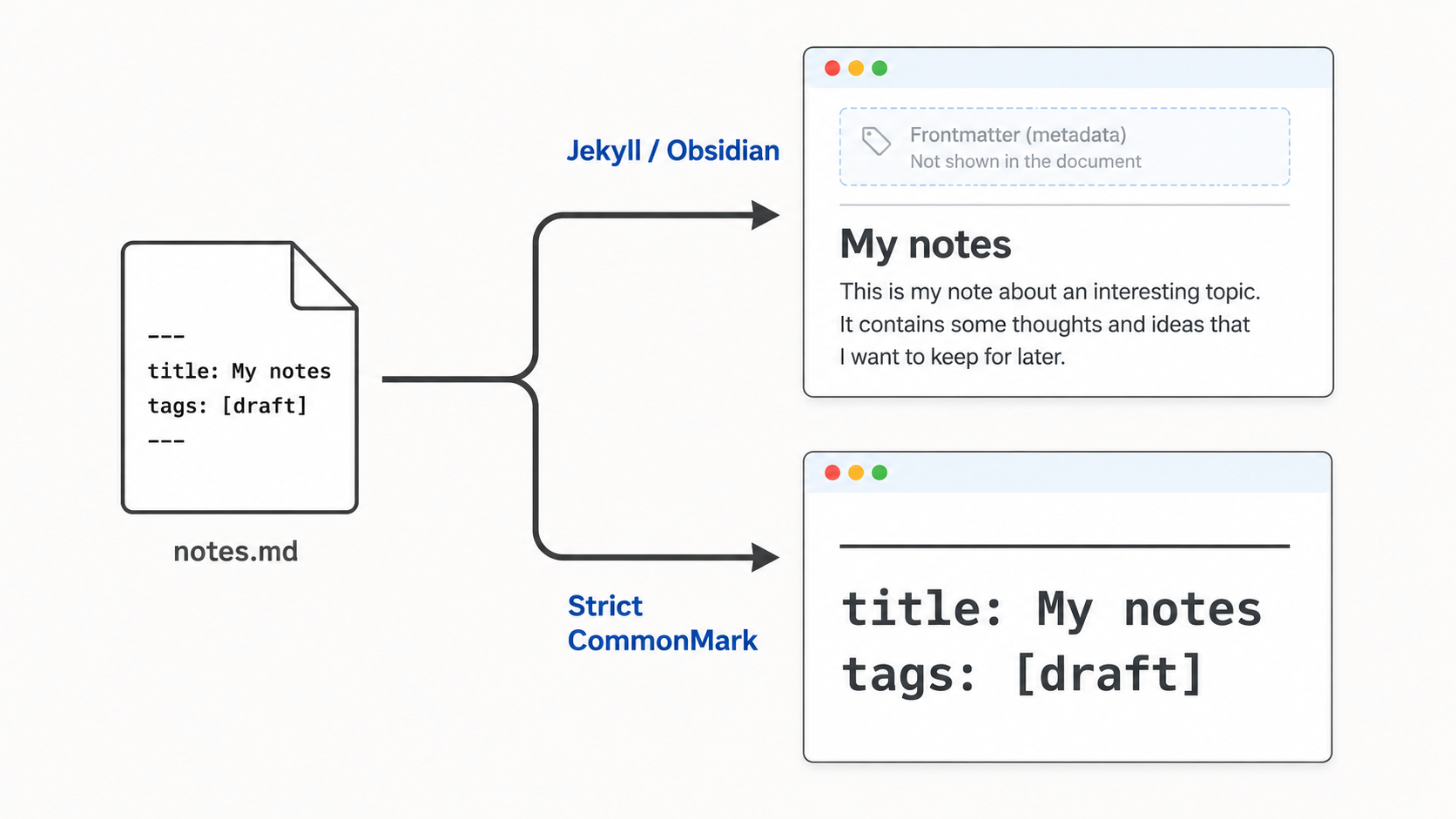
It is also the one with the nastiest failure mode, because front matter doesn’t degrade into nothing. It degrades into different content. Take a strict CommonMark parser — the floor of the ring, the thing everything supposedly agrees on — and feed it:
---
title: My notes
tags: [draft]
---
In CommonMark, a leading --- is a thematic break. Then title: My notes and tags: [draft], sitting directly above another ---, form a setext heading — the entire metadata body, both lines of it, promoted to a level-2 heading. So the file that started with invisible metadata now opens with a horizontal rule and a big bold “title: My notes tags: [draft]”. GitHub’s renderer splits the difference and displays front matter as an actual table, which is at least honest. But a file that crosses from Obsidian into a strict CommonMark pipeline doesn’t just lose its metadata — it gains a heading that was never written.
Failure mode: the worst in the post. Silent, and it adds content.
The full map
Everything above, scored against the three contracts — parse, semantics, presentation — plus who owns each feature and how it fails. ”✓” means it survives, ”✗” means it doesn’t, ”~” means it depends on the tool.
| Feature | Owned by | Parse | Content | Semantics | Typical fallback | Fails |
|---|---|---|---|---|---|---|
| Tables, task lists | GFM (in the ring) | ✓ | ✓ | ✓ | native rendering | — |
Footnotes [^1] | PHP Markdown Extra | ✓ as plain text | ✓ | ✗ | literal [^1] + stray definitions | mild |
Math $…$ / $$…$$ | Pandoc / academia | ~ inconsistent | ~ raw TeX visible | ~ | raw LaTeX source | loud |
| Mermaid diagrams | Mermaid (the project) | ✓ fenced block | ✓ | only with renderer | ordinary code block | safe |
Callouts > [!NOTE] | Obsidian, adopted by GitHub | ✓ as blockquote | ✓ | ~ fixed vs custom types | blockquote with [!NOTE] marker | mild |
Wikilinks [[…]] | Wiki culture via Obsidian | ✗ | ✓ | ✗ | literal brackets | noisy |
| YAML front matter | Jekyll | ✗ corrupts parse | ✓ | ✗ | hr + setext heading, or visible YAML | wrong |
Highlight ==…== | Typora / iA Writer era editors | ✗ | ✓ | ✗ | literal == delimiters | noisy |
The rule that falls out
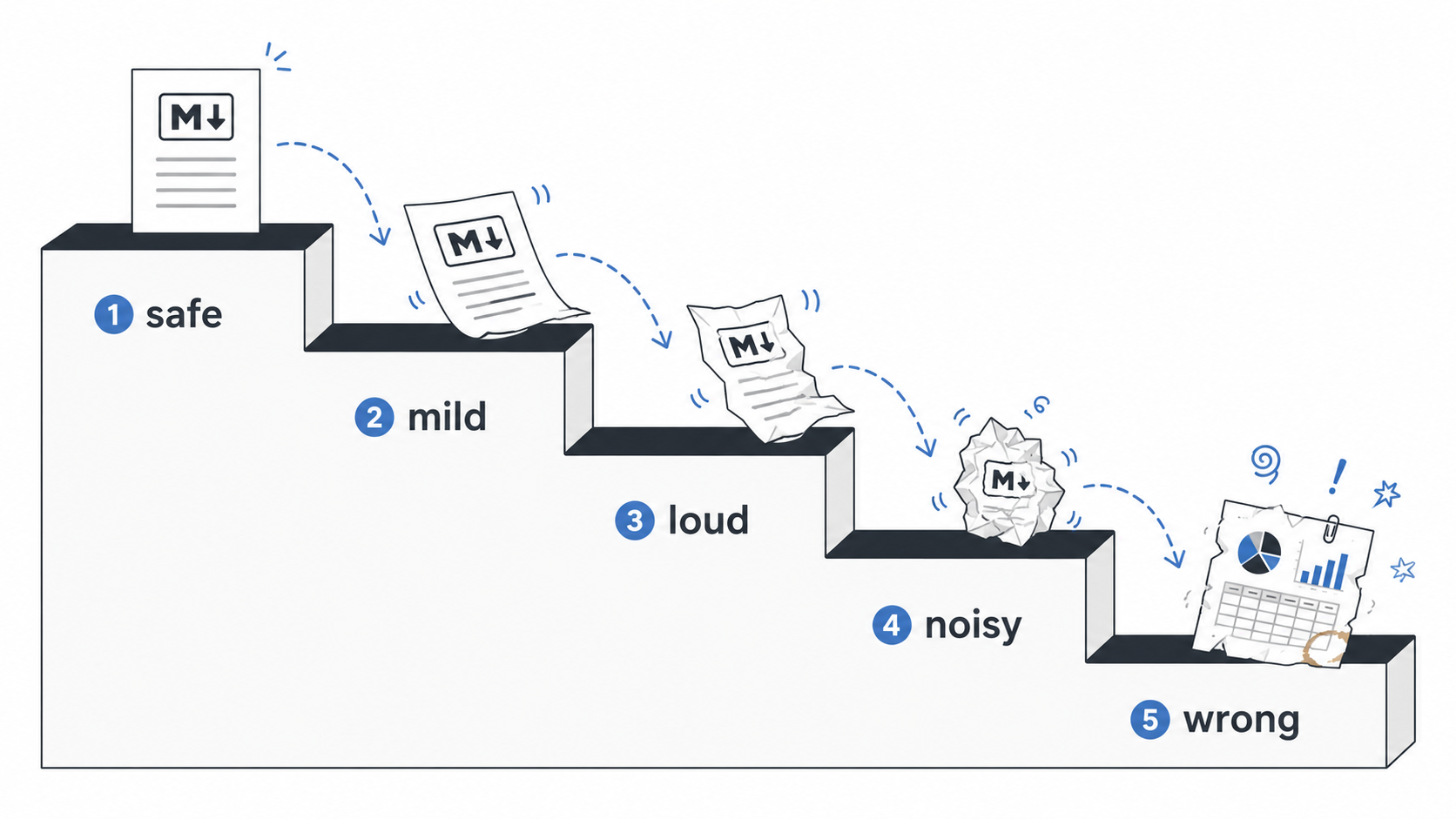
The last post ended with “stay inside the ring unless you’re targeting one tool on purpose.” This post lets us sharpen that. When you reach for a feature outside the ring, you’re not really choosing a syntax — you’re choosing a failure mode for every tool that isn’t yours:
- Fails safe — degrades to readable source: Mermaid and other fenced-block features. Use freely; the worst case is a code block.
- Fails mild — degrades to visible but harmless noise: footnotes, callouts, highlight. Fine for anything you’ll also read elsewhere.
- Fails loud — degrades to gibberish for non-authors: math. Acceptable when your audience knows LaTeX anyway.
- Fails noisy — degrades to machine-flavored text: wikilinks. Keep these inside your vault, or run a publish step that converts them.
- Fails wrong — silently becomes different content: YAML front matter. Never let it reach a pipeline you haven’t tested.
What to do in practice
If your Markdown never leaves one tool, none of this matters. If it travels:
- Pick your dialect on purpose. Treat
.mdas a family name, not a language identifier, and decide which extensions your documents are allowed to use. - Prefer features whose failure mode you can live with. Fenced-block extensions (Mermaid,
```math) fail safe; inline ones (wikilinks, highlight) leak punctuation; front matter fails wrong. Rank them accordingly. - Convert at boundaries instead of hoping. Wikilinks become real links, callouts become blockquotes, and front matter gets stripped or consumed in the publish step — not in the reader’s parser.
- Test real fixtures through the actual parsers in your pipeline. Two tools that both claim “Markdown support” can disagree at exactly the point where your workflow breaks, and the only way to find that point is to run your own documents through it.
There is no standards body coming to fix any of this. CommonMark froze at the core by design, the GFM spec hasn’t absorbed even footnotes, and every feature above is governed by the release cadence of whichever tool owns it. The best you can do is know which failure mode you’re buying.
Which raises the obvious next question: if humans can’t keep these flavors straight, what about the machines now writing most of the Markdown? We ran a census of what AI models actually emit — which constructs dominate, and which of the features above essentially never appear. That’s the next post.